
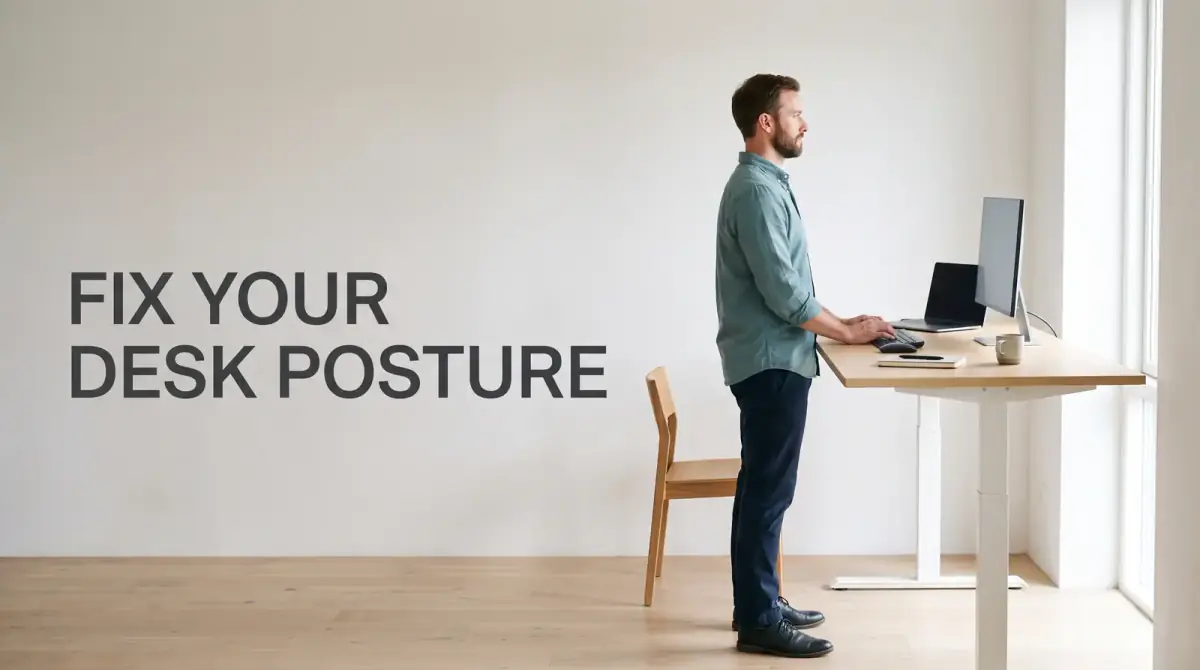
The short answer
Why sitting up straight fails, how to set up your desk properly, and four micro-exercises that undo the damage of a long day at a screen.
- Monitor height: the top third of the screen should sit roughly at eye level, so your gaze drops slightly rather than your chin poking forward. A stack of books works as well as a stand.
- Monitor distance: about an arm's length away. If you find yourself leaning in, the problem is usually font size, not distance. Enlarge the text.
- Chair height: set it so your forearms are roughly parallel to the floor when your hands are on the keyboard, with elbows near your sides rather than out in front.
- Feet: flat on the floor or on a footrest. Dangling feet drag your pelvis into a slouch.
- Lumbar support: the chair should meet the small of your back. A rolled towel does the job on a chair that doesn't.
At nine in the morning your back feels fine. By three in the afternoon there is a hot band of ache across your shoulders, your neck feels like it has been holding up a bowling ball all day, and your lower back is quietly filing a complaint. The most useful posture fixes for desk workers are not about sitting up straighter through sheer willpower. They are about changing position often, setting up your desk so your body is not fighting it, and giving a few neglected muscles something to do.
That is the honest answer, and it lands badly with anyone hoping for one perfect sitting position. There isn't one. Your best posture is your next posture, and the sooner you stop chasing a pose and start chasing variety, the sooner the 3pm ache stops showing up.
Why does desk work wreck your neck, shoulders and lower back?
Sitting is not the villain here. Sitting still is. Muscles, discs and ligaments are built to be loaded and unloaded in cycles, and they get cranky when a load never changes. Eight hours in one shape is a long time to ask any tissue to hold its breath.
Three things tend to go wrong at once. Your head drifts forward toward the screen, which multiplies the work your neck extensors have to do just to stop your skull tipping off the front of your spine. Your upper back rounds and stiffens into that rounded shape until extending it feels foreign. And your hips stay folded at ninety degrees for hours, which shortens the front of the hip while your glutes clock out entirely.
Add a mouse that lives too far forward, and your shoulder blade gets dragged around the ribcage all day. That combination is what produces the very specific desk-worker complaint: a burning knot between the shoulder blade and the spine that no amount of rubbing fixes.
The "sit up straight" myth
Being told to sit up straight produces about four minutes of rigid military posture followed by a deeper slump than before. Holding a "perfect" position is still holding a position, and static loading is the actual problem. Research on posture and back pain has been surprisingly unhelpful to the perfect-posture crowd, and most physiotherapists have shifted their advice accordingly.
Duration matters more than shape. A slightly imperfect posture you break up every half hour will treat you far better than an immaculate one you hold for three hours straight.
How should you set up your desk, chair and monitor?
Ergonomics will not fix a body that never moves, but a bad setup guarantees you will move into the same bad shape every time. Get these basics right once and stop thinking about them.
- Monitor height: the top third of the screen should sit roughly at eye level, so your gaze drops slightly rather than your chin poking forward. A stack of books works as well as a stand.
- Monitor distance: about an arm's length away. If you find yourself leaning in, the problem is usually font size, not distance. Enlarge the text.
- Chair height: set it so your forearms are roughly parallel to the floor when your hands are on the keyboard, with elbows near your sides rather than out in front.
- Feet: flat on the floor or on a footrest. Dangling feet drag your pelvis into a slouch.
- Lumbar support: the chair should meet the small of your back. A rolled towel does the job on a chair that doesn't.
- Mouse and keyboard: close in, so you are not reaching forward. Reaching is what recruits your shoulder and neck into typing.
- Laptop users: a laptop on a desk forces a choice between hunched neck and raised wrists. An external keyboard plus a riser solves it for very little money.
If you have a sit-stand desk, resist treating standing as the cure. Standing rigidly for four hours is its own kind of static load. Alternate every 30 to 45 minutes and let the change itself be the benefit.
Four micro-exercises that undo the desk shape
These take under three minutes combined. They target exactly the tissues that go quiet during a work day, and they can all be done beside your chair without changing clothes or explaining yourself to colleagues.
1. Chin tucks
Sit tall, look straight ahead, and glide your head backward as if making a double chin. Do not tip your head down or up. Hold for a slow count of five, release, and repeat around eight to ten times. This wakes up the deep neck flexors that forward-head posture switches off.
2. Doorway chest stretch
Place your forearm on a doorframe with your elbow at shoulder height, then step gently through until you feel a stretch across the front of the chest. Hold about 20 to 30 seconds per side. Chest tightness is half the reason your shoulders round forward.
3. Thoracic extension over the chair back
Sit with the chair back at roughly the level of your shoulder blades, lace your hands behind your head, and ease your upper back backward over the edge of the chair. Breathe out as you extend. Five slow repetitions. Keep your ribs from flaring and your lower back from taking over — the movement belongs to your mid-back.
4. Glute activation
Stand up and do ten to fifteen bodyweight hip hinges or glute squeezes, or a short set of standing hip extensions holding the desk for balance. Glutes that have been sat on all morning stop supporting your pelvis, and your lower back quietly picks up the slack.
Movement snacks beat one big workout
An hour at the gym is excellent and does almost nothing for what happens between 9 and 5. What helps is frequency: small, repeated interruptions to the same position.
- Set a timer for every 30 minutes. When it goes off, change something — stand, shift, stretch, walk to the kettle.
- Take phone calls standing or walking. Meetings you don't have to screen-share for are free movement.
- Fill a smaller water glass so refills force you up more often.
- Park the printer, bin or charger somewhere slightly inconvenient.
- Use the last two minutes of every hour for one of the four exercises above. Rotate through them.
The goal is not to burn calories. It is to stop any single tissue from being loaded the same way for hours on end.
How long until you actually feel better?
Most people notice something within one to two weeks — usually that the afternoon slump in their neck arrives later, or with less bite. Genuine change in strength and stiffness takes longer, more like six to eight weeks of reasonably consistent work. That gap between "feels better" and "is better" is where most people quit, which is why the ache comes back.
Some pain is worth a professional opinion rather than a stretch. See a doctor or physiotherapist if you have numbness, tingling or weakness running down an arm or leg, pain that wakes you at night, pain following a fall or accident, or discomfort that steadily worsens over a few weeks despite sensible changes. Ordinary desk stiffness eases when you move. Pain that ignores movement entirely is a different conversation.
The posture fixes for desk workers that actually stick
If you do one thing from all of this, make it the 30-minute timer. Setup tweaks are worth doing and the exercises genuinely help, but the single habit that reliably moves the needle is interrupting stillness before your tissues start protesting.
Stop trying to sit correctly. Start sitting differently, often, and give your neck and glutes two minutes of attention a few times a day. The afternoon ache is not the inevitable cost of desk work — it is feedback, and it responds faster than you would expect.



Comments
0 total